Field notes · Python / automation · · 12 min read
How I Built an AI-Powered SEO Command Center for Windows
I wanted a better answer to a simple question: what should I actually do with my website's search data this week?
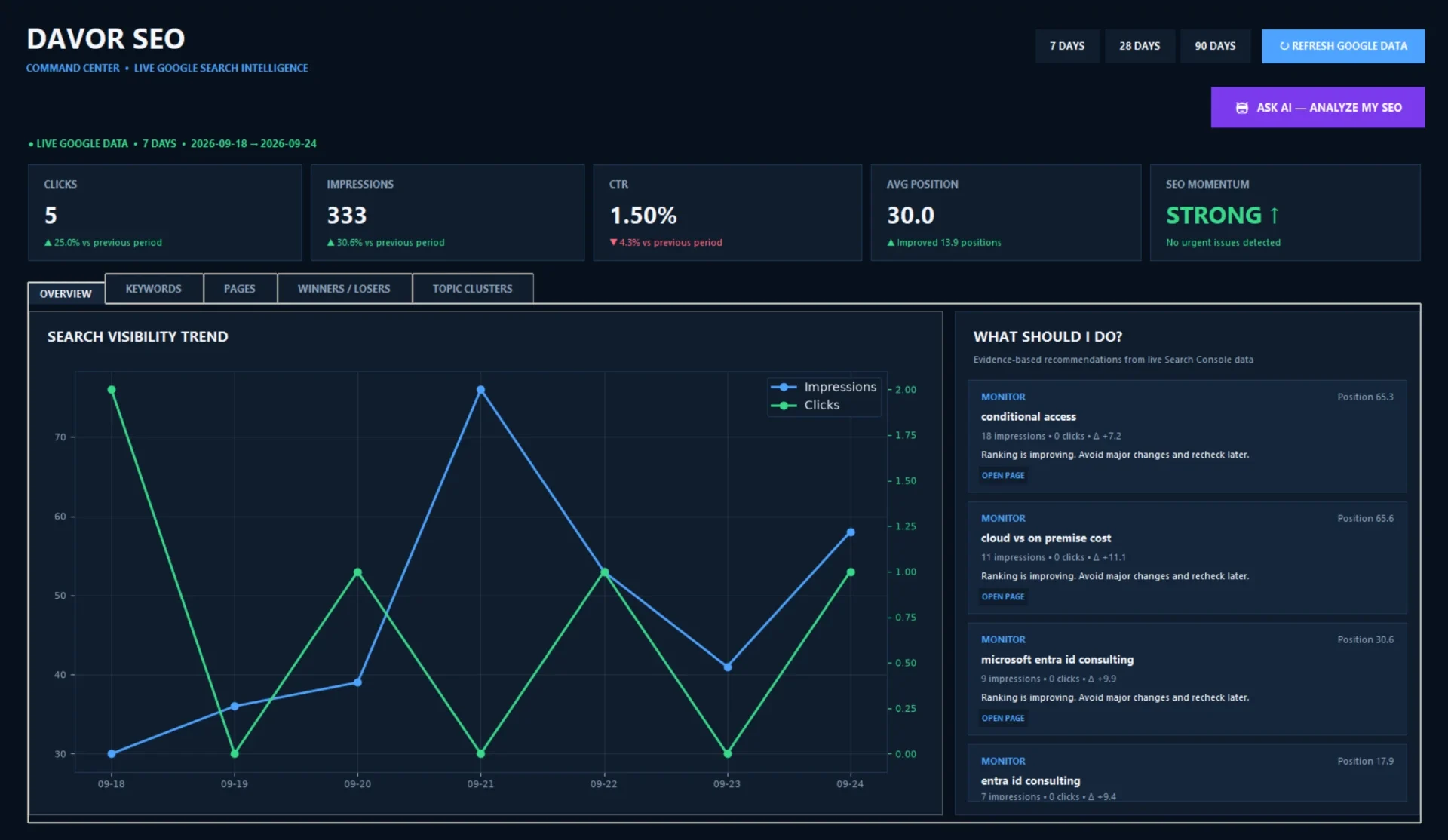
Google Search Console gives me useful information about davor.app: the queries that bring impressions, the pages people find, clicks, click-through rate and average position. But the data is spread across views. A rising impression count might be good news—or it might mean a page is showing for the wrong searches without earning clicks. A falling average position might reflect one weak query, a broader decline, or just a change in which queries appeared that week.
I built DAVOR SEO Command Center, my own Python/Tkinter Windows desktop application, to bring those signals together and make the next step easier to decide. It connects to the Google Search Console API for real data from my site, compares recent periods, highlights opportunities and risks, and offers an AI analysis grounded in the structured results. I packaged it as an executable with its own desktop shortcut. It is a tool I can open and use every week—not a slide deck or a demo screen.
This is the story of the problem, the architecture and the less glamorous work required to turn a useful script into a usable Windows application.
The problem I wanted to solve
I work on the content and technical side of my own website. I can see a search query getting impressions and no clicks, but interpreting it properly takes more than reading one number. I need to know which page owns the query, whether the page moved compared with the previous period, whether its title matches the searcher's intent and whether changing it is likely to help or disturb something that already works.
Manually repeating that exercise across queries and pages is slow. It is also easy to be distracted by a large number that has little practical value. A dashboard that only says “traffic is up” does not help me choose between improving an existing page, writing a more focused article or leaving a well-performing page alone.
So the design brief was deliberately narrow: bring live Search Console information into one place, compare periods, sort the meaningful changes and present a short list of actions I can assess. The application should support my judgment, not replace it. It does not promise rankings or automatically rewrite content.
From Search Console to a useful decision
The core is a Python desktop GUI built with Tkinter. It authenticates for the Google Search Console API using OAuth, requests performance data for https://davor.app/, and organises the returned query and page data for comparison. There is also an OpenAI API integration behind the ASK AI — ANALYZE MY SEO action. Only the structured data needed for analysis goes to that step; the AI is asked to reason from the site's actual search signals rather than generic SEO assumptions.
In practice the path looks like this:
OAuth and API keys are operational credentials, not blog content. I have not put tokens, key fragments, OAuth files or secret configuration into this article, and the screenshots shown here are cropped so they contain no credentials or unrelated desktop content. That is as much a part of a practical workflow as the chart or the analysis itself.
One important distinction: Search Console reports performance in Google's search results, not a complete inventory of every visit to the site. Position and CTR are context-sensitive. I compare like periods and use changes as investigation prompts, not as proof that a single edit caused a ranking movement.
Making the numbers actionable
The dashboard brings clicks, impressions, CTR and average position together with an indication of SEO momentum. From there I can inspect keyword and page changes between recent performance periods rather than looking only at the latest snapshot. If a page gains impressions but its CTR weakens, that is a different question from a page losing both impressions and clicks. A query approaching page one may deserve a targeted improvement; a page that has slipped needs a closer look at its intent, freshness and competing results.
I organise the output around quick wins, declining pages, near-page-one opportunities and prioritised actions. These are categories for triage, not automatic prescriptions. A position close to page one does not guarantee an easy win, and an apparently declining page may simply have too little data for a confident conclusion.
Visibility
Impressions and query changes indicate where the site is appearing and where demand may be changing.
Engagement
Clicks and CTR help identify results people see but do not choose.
Movement
Period comparisons expose improving or declining queries and pages worth investigating.
Priority
Near-page-one opportunities and at-risk pages turn a long export into a review queue.
For example, before changing the title of a page, I want to know whether it already earns clicks for an important query. The “do not touch” category is valuable precisely because optimisation is not always about doing more. Sometimes the right decision is to preserve a page that is already doing its job and work on a weaker neighbour instead.
Asking AI better questions
The ASK AI — ANALYZE MY SEO function sends structured live Search Console data to the OpenAI API for a tailored verdict. The analysis is organised into TOP 3 ACTIONS THIS WEEK, QUICK WINS, PAGES AT RISK, CONTENT OPPORTUNITIES, DO NOT TOUCH and WHAT I WOULD DO FIRST. That structure forces a useful distinction between immediate priorities, potential experiments and areas where restraint is sensible.
I do not want an assistant to tell me that “content is king” or to make up a traffic forecast. I want it to point to a specific page or query in the data, explain why that item deserves attention, and give me an action I can check. If the signal is weak, the responsible answer is to say so. The API makes the analysis faster to draft; the person using the tool still verifies the recommendation against the page, the search result and the wider site.
This project connects to a broader principle in my work: AI is most useful when paired with context and a clear boundary. I have written about moving beyond generic AI automation and about how good leaders use AI to amplify judgment. In this application the same idea is concrete: the model works from site data and produces reviewable suggestions, not autonomous edits.
Building an interface that stays responsive
A command-line script can be useful to the person who wrote it. A desktop tool I intend to open weekly needs a better experience. Tkinter gave me a direct way to build a Windows GUI with the controls and result views I needed without pretending this was a large enterprise platform.
Search Console requests and AI analysis can take time. If that work runs on the GUI's main event loop, the window appears frozen while it waits. I used threading to keep long-running API and AI operations away from the interface thread, then return results to the UI safely. The practical test was simple: could I tell the app was working, and could the window continue responding while it did?
The AI result window needed its own iteration. The first useful answer was still awkward to read because the output appeared as raw markdown. I improved the presentation so headings, bold emphasis, dividers and scrolling make a long analysis navigable. Formatting is not a decorative extra when the point of the tool is to make a decision from a lot of information; if “what I would do first” is buried in a wall of markup, the workflow has failed.
The unglamorous part: getting it to work
The path from a working Python file to a dependable Windows app was not a straight line. I dealt with indentation and syntax problems in Python, checked PyInstaller's build paths, and found that the icon source file I expected was missing. These are ordinary engineering problems, but each can stop a perfectly reasonable idea from becoming something another person—or even my future self—can reliably open.
I chose not to overwrite a working executable while testing the final build. Keeping the existing build gave me a rollback path: if the new packaging failed, I still had a version I could run. When the original icon source was unavailable, I reused the icon embedded in an existing EXE as the source for the final build icon. That resolved a real packaging obstacle without replacing the branding with a random placeholder.
PyInstaller produced the Windows executable. I then added a custom DAVOR SEO desktop shortcut and icon so I can launch it like a normal Windows application—no manual Python command and no CMD window to start a script. That last step matters. Packaging is part of usability: the fastest tool to use is the one you can actually find and open when you need it.
The practical lesson: test changes incrementally, keep the last working version available, and treat deployment details—paths, icons, shortcuts and launch behaviour—as part of the product.
Screenshots of the finished app
How I actually use it
My weekly review starts by refreshing Search Console data and checking the comparison against the previous period. I look at which queries and pages gained or lost visibility, then separate changes that deserve investigation from ordinary noise. If a page is near page one, I inspect the page itself and the searcher's likely intent before touching it. If clicks and CTR have dropped, I check whether the title, description and content still make an honest promise to the person searching.
Then I run the AI analysis as a second opinion. Its action list helps me decide what to inspect first, but I do not treat its verdict as permission to change a page blindly. A suggestion becomes an action only after I verify the underlying numbers, read the existing page and consider whether the change would improve the reader's experience. My Copenhagen IT support guide and the Conditional Access policy-review article are examples of content where matching the page's purpose matters more than adding another keyword.
The result is a repeatable routine: data, comparison, shortlist, human review, carefully chosen improvement, then another measurement cycle. It saves the mental overhead of rebuilding the same analysis each week while keeping final decisions with me. I have not assigned a made-up traffic improvement or ranking gain to the application. The measurable value at this stage is that I have a working, reusable tool for making more informed SEO decisions on my own site.
What this project demonstrates
API integration and OAuth
Connect an application to a live service, authenticate appropriately and shape response data around a real workflow.
Python and GUI engineering
Build a usable Tkinter desktop interface, render complex results clearly and keep network work off the GUI thread.
Data interpretation
Compare periods, separate opportunities from risks and resist drawing conclusions from one metric alone.
AI-assisted automation
Provide structured data and useful output constraints so an AI response can be reviewed instead of blindly trusted.
Debugging and delivery
Work through syntax, file-path and packaging failures; preserve a known-good build; ship an executable with a recognisable Windows shortcut.
These are not labels pasted onto a finished screenshot. They are the decisions involved in building and maintaining the tool. The scope is intentionally honest: a personal Windows application solving a real problem for my own site, not an enterprise SEO platform.
A takeaway for technical teams
For a recruiter or technical lead, the most interesting part of this project may not be SEO at all. It is the way the work moves from an operational problem to a usable outcome: understand what decisions need support, collect trustworthy data, automate repetitive analysis, make the interface readable, test the edges, preserve rollback and deliver something that opens reliably on a real desktop.
That is also how I approach broader IT work. Whether the context is an application, a support process or an IT case study, the goal is not to add technology for its own sake. It is to reduce friction while keeping ownership, security and judgment visible. A tool earns its place when it makes the next good decision easier.
DAVOR SEO Command Center does that for me. It brings real Search Console performance into one Windows application, helps me spot movement, and uses AI to frame concrete next steps without pretending that a model can replace careful review. The most satisfying part is that after all the syntax fixes, build paths and icon work, I can simply open it on Monday and use it.
About the author
Davor Smajilovic is a Copenhagen-based IT specialist with 15+ years of professional IT experience and 17 professional certifications. He works across IT support, Microsoft cloud technologies and practical automation, and is open to new IT opportunities.
View my experience and availability