Personal project · Python / search analysis ·
Building My Python SEO Command Center: From Search Data to Better Decisions
A desktop tool I built for my own site to connect search data, the page that is actually live and the decisions I have already made.
Davor Smajilovic · Independent project · AI-assisted development
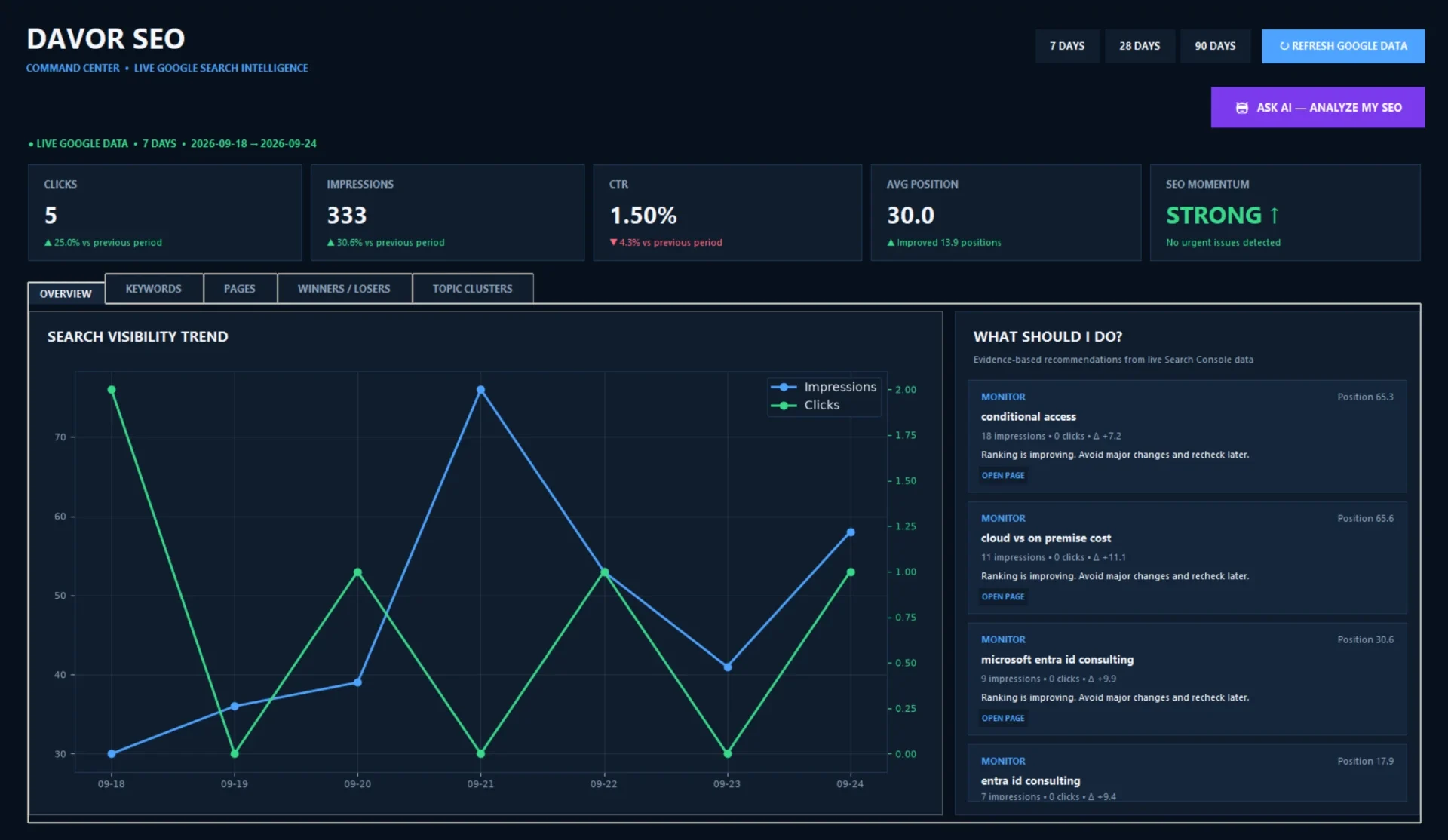
I built this because I wanted a clearer answer to a simple question: what should I improve on my website next—and what should I leave alone? Google Search Console gave me the numbers. I wanted a tool that connected those numbers to the current website, the changes I had already made and a decision I could explain.
The problem was not a lack of data
When a query gains impressions but not clicks, I can change the page title, add a link, or write something new. But I may have already made the relevant change; the page might be improving on a small sample; or the search intent might belong to a different page entirely. Acting on the first number that moves can create more noise than progress. For my own site, I needed a repeatable way to ask whether an action was justified before creating another task.
I built and iterated Davor SEO AI Command Center, a Python Windows desktop application, with AI assistance. I owned the problem definition, reviewed the recommendations against my live pages, tested successive versions and kept publication decisions with me. AI helped accelerate development and analysis; it did not become the authority on what should go live. The companion technical build article covers the earlier application architecture in more detail. This case focuses on how the workflow matured.
What the application brings together
Signals in context
A user-triggered Refresh Google Data retrieves read-only Search Console metrics: clicks, impressions, CTR and average position. I compare 7-, 28- and 90-day views, including period-over-period movement, rather than treating one day as a trend.
Queries and pages
Keyword and landing-page analysis surfaces winners and losers, topic clusters and candidates for closer inspection. A near-page-one query is an invitation to investigate, not proof that a rewrite is needed.
Memory and decisions
Local historical records hold earlier observations, changes and decisions. The recommendations engine can distinguish a new opportunity from a title, heading or internal-link change that is already live—and preserve a reviewed no-change decision.
AI with a review boundary
Ask AI uses OpenAI to analyse structured evidence. The app can prepare a copy-ready Lovable implementation prompt, but neither the model nor the prompt publishes a page. I still inspect, edit and approve the result.
Automation needs a memory
A recommendations list without memory can tell me to fix the same page again next week. The later live-site audit, added in v2.1, gave the decision engine another check: does the proposed change correspond to the page that is actually live? Combined with local change history, it can account for recently verified title and meta-description edits, headings, content and internal links rather than recycling them as fresh advice.
I also introduced safeguards for decisions to leave a page alone. If I have reviewed a page and chosen no change, the tool should not reopen that decision merely because it can generate a different suggestion. I want material new evidence or a genuinely broken SEO element first. That protects improving pages from unnecessary edits and keeps a relevant page from becoming a collection of awkward search phrases. No one benefits from a title rewritten for the fifth time because one query had a quiet Tuesday.
The application has an internal opportunity or momentum score to help order my review queue. It is not a Google score. I look instead at visibility, relevant clicks, CTR and query and page positions across comparable periods, and I treat small samples carefully. A dashboard can help me identify where to investigate; it cannot establish that one change caused a ranking movement.
From evidence to a decision
Illustrative workflow · not a product screenshot
- 01Refresh GSC
- 02Audit live page + history
- 03Prioritise
- 04Draft targeted prompt
- 05Review preview
- 06Approve & measure
I refresh Google data when I choose, inspect the live page and prior changes, analyse the opportunity, prepare a targeted Lovable prompt, review the preview and validate it, then approve publication myself. Later periods tell me whether the original decision still makes sense. There is no working periodic background refresh to rely on.
The engineering lessons were practical
Search Console access is read-only through OAuth: analysis should not need permission to edit the source of its data. Local history gives my future self the context that an API response cannot: what I changed, why, and whether I decided to wait. Separating recommendations from publication gives the person responsible for the site a chance to verify the live evidence and reject a plausible-sounding but unnecessary change.
Packaging taught a different lesson. Earlier PyInstaller builds and a custom Windows icon and shortcut worked, but a Python script and a packaged EXE do not always resolve files and runtime paths in the same way. In the later v2.4.1 iteration, Python data loading worked while an EXE data-loading regression remained to be verified. I would not call the latest executable fully validated until that path is retested on the packaged build. The functional analysis workflow and a dependable distributed binary are related, but they are not the same milestone.
What I have—and what I would test next
I now have a working way to move from raw search signals to a reviewable action: gather data, compare periods, inspect what is live, recall what changed, and decide whether to act. That is a useful outcome for me, not a claim that the tool has delivered guaranteed rankings, measured time savings or causal traffic growth. Next I would verify the v2.4.1 EXE loading path and continue tracking decisions against subsequent search periods long enough to separate promising signals from noise.
For recruiters and businesses, the broader lesson is about building automation around a real operating decision. The same habits—least-privilege access, a reliable record of changes, explicit review gates and honest testing—apply beyond SEO. They are how I approach practical IT workflows for small businesses too: remove repetitive work, but keep accountability where it belongs.